
Yuma product update: generated audio that fits your DAW
Every vocal, sample, and sound effect Yuma makes now lands as a normal WAV file you can preview, reveal, drag, and keep.
Last updated June 18, 2026

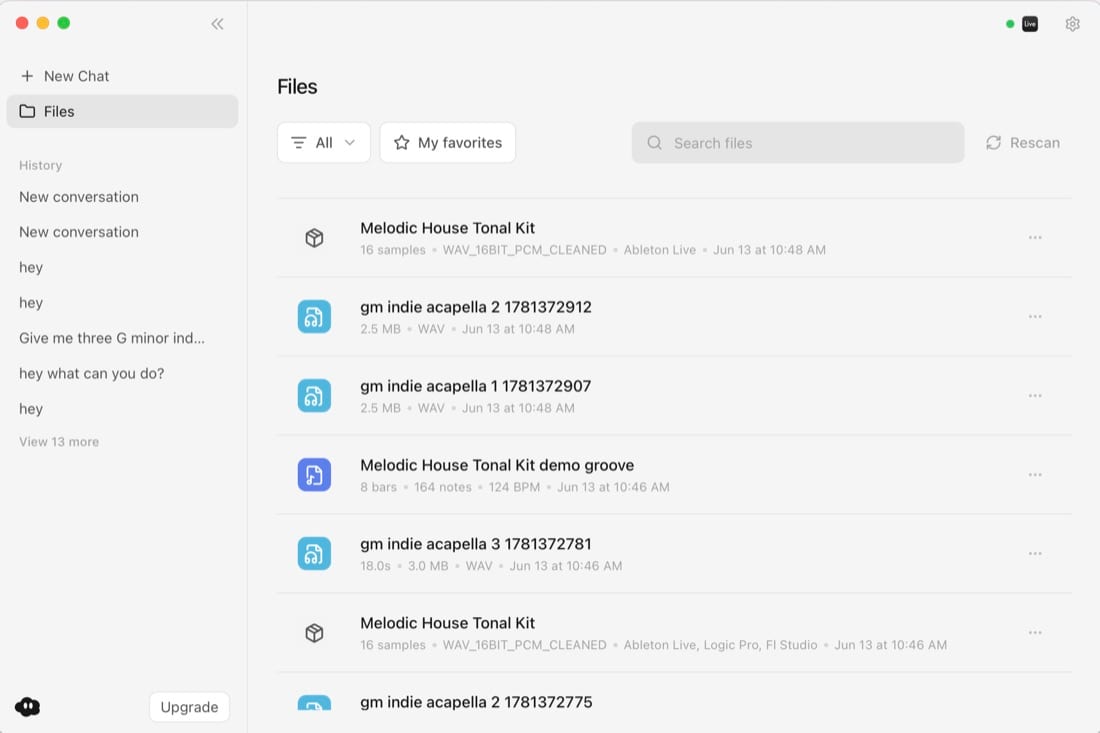
Yuma now saves generated audio as WAV files in ~/Documents/Yuma/Audio. Vocals, samples, and sound effects show up in a visible folder, preview inside the app, and drag into Ableton, Logic, FL Studio, Pro Tools, Bitwig, or any other DAW.
This product update is about a basic promise: if Yuma makes audio for you, that audio should behave like material in a producer's studio. You should be able to find it, audition it, drag it, rename it, archive it, and keep using it after the chat is over.
Generated audio only matters if you can find it again.
What's new
Generated audio now behaves like part of your DAW workflow.
Before this update, an AI audio result could feel too temporary. A sound might exist in a chat card, but the workflow around that sound was weaker than the workflow producers already have for samples, vocals, one shots, stems, and field recordings.
Now Yuma treats generated audio as a file-first asset:
- WAV output: vocals, samples, and sound effects save as standard audio files.
- Visible folder: generated audio lands in
~/Documents/Yuma/Audio. - Preview in Yuma: audition a take before moving it into a DAW.
- Reveal in Finder: jump straight to the file on disk.
- Download: keep another copy wherever you organize sounds.
- Drag into your DAW: drop the file into Ableton, Logic, FL Studio, Pro Tools, Bitwig, or another music app.
That is less flashy than a new model name. It is also the kind of change that makes AI audio usable in actual production.
Where your audio lives
Generated audio now goes here:
~/Documents/Yuma/Audio
That folder sits next to:
~/Documents/Yuma/Drum Kits
~/Documents/Yuma/Stems
The Yuma folder is meant to be boring in the best way. Open Documents, open Yuma, grab the thing you made.
That folder structure also makes generated audio easier to back up. If you use iCloud Drive, Dropbox, external drives, a sample manager, or a project archive system, you can treat Documents/Yuma/Audio like any other source folder.
What changed in the app
Every generated audio asset now gets a card with the actions producers expect:
- Preview: audition the sound inside Yuma.
- Reveal in Finder: jump to the exact file.
- Download: keep a copy wherever you want.
- Drag: drop the file into Ableton, Logic, FL Studio, Pro Tools, or any other DAW.
The card points at the same file on disk. The sound in Yuma and the sound in Finder are the same asset.
Why file behavior matters
Audio production is full of small file decisions. You make a sound, audition it, trim it, name it, put it in a project, bounce it, resample it, or throw it away.
When AI audio ignores that workflow, it becomes annoying fast. A good vocal texture is useless when its location is unclear. A good riser loses momentum if you have to download it twice, rename it from a random filename, and remember which browser tab made it.
Yuma is trying to make generated audio feel like studio material from the start.
You can ask for:
Create a breathy vocal texture for the pre-chorus.
Make a short metallic impact for the transition into the drop.
Generate a dusty percussion one shot that would work in a house track.
Each result can become a WAV file you keep. From there, the choice is yours: drag it onto an Ableton audio track, drop it into a sampler, chop it into a Drum Rack, warp it, reverse it, pitch it, or save it into your own library.
Real WAVs
Yuma saves vocals, samples, and sound effects as WAV files. When a provider can return PCM or WAV directly, Yuma asks for the real format at the source.
Converting a compressed file into WAV makes the file larger without making it better. We avoid that whenever the source can give us proper audio.
This is practical. Producers care about what the file does in the session: whether it imports cleanly, previews quickly, survives project organization, and sounds right after editing.
How this works with Ableton
Ableton is still Yuma's deepest integration. When Yuma is connected to Ableton Live, generated audio can be inserted onto an Arrangement audio track as a real clip.
That opens up a useful workflow:
- Ask Yuma for a vocal, sample, one shot, riser, or sound effect.
- Preview the result in the app.
- Insert it into Arrangement View or drag the WAV into the track yourself.
- Warp, fade, trim, resample, or process it in Ableton.
- Keep the source file in
Documents/Yuma/Audiofor later.
Session View audio clip-slot insertion is limited by Ableton's API today, so Arrangement is the direct placement path for generated audio. The portable file still works everywhere. You can drag the WAV into Session View, Simpler, Drum Rack, or any other place you normally use audio.
Why this matters for non-Ableton producers
Yuma started as AbletonGPT, and Ableton control remains the strongest path. The product is also useful outside Ableton because files travel.
If you produce in Logic, FL Studio, Pro Tools, Bitwig, Reaper, Studio One, or another DAW, a generated WAV file is the common language. You can import it, drag it, sample it, stretch it, and organize it without caring how Yuma made it.
| Workflow | What Yuma gives you | Where it works |
|---|---|---|
| Vocal idea | WAV file in Documents/Yuma/Audio | Ableton, Logic, FL Studio, Pro Tools, Bitwig, any DAW |
| One shot | WAV file plus preview and reveal actions | Samplers, drum racks, sample folders |
| Sound effect | WAV file you can drag into a timeline | Arrangement views, video edits, game audio work |
| Texture | WAV file you can warp, reverse, chop, or resample | Audio tracks and samplers |
Why this matters
Producers already have file workflows. You browse sounds, audition them, drag them, rename them, and keep the ones worth keeping.
Yuma should fit that muscle memory. When it makes a vocal chop, a one shot, a riser, or a texture, you should be able to use it anywhere without wondering where the app put it.
This update makes generated audio feel less like a chat response and more like part of the project. That is the point. AI music tools get better when they respect the boring parts of music work: files, folders, formats, drag behavior, and the moment when a sound has to land in the song.
Try Yuma audio generation or read how Yuma controls Ableton Live.
Frequently asked questions
- Where does Yuma save generated audio?
- Yuma saves generated audio in ~/Documents/Yuma/Audio, alongside your Drum Kits and Stems folders. It is a normal Finder location you can browse to, not a hidden app folder.
- What format are Yuma audio files?
- Yuma saves vocals, samples, and sound effects as WAV files. When a provider can return PCM or WAV directly, Yuma asks for that instead of converting a compressed file afterward.
- Can I use Yuma audio outside Ableton?
- Yes. Every generated file is a standard audio file you can drag into Logic, FL Studio, Pro Tools, Bitwig, Ableton, or any other DAW.