
How Yuma controls Ableton Live
Yuma connects to the Ableton set you already have open, reads session context, and writes MIDI, audio, automation, and rack assets from chat.
Last updated June 18, 2026

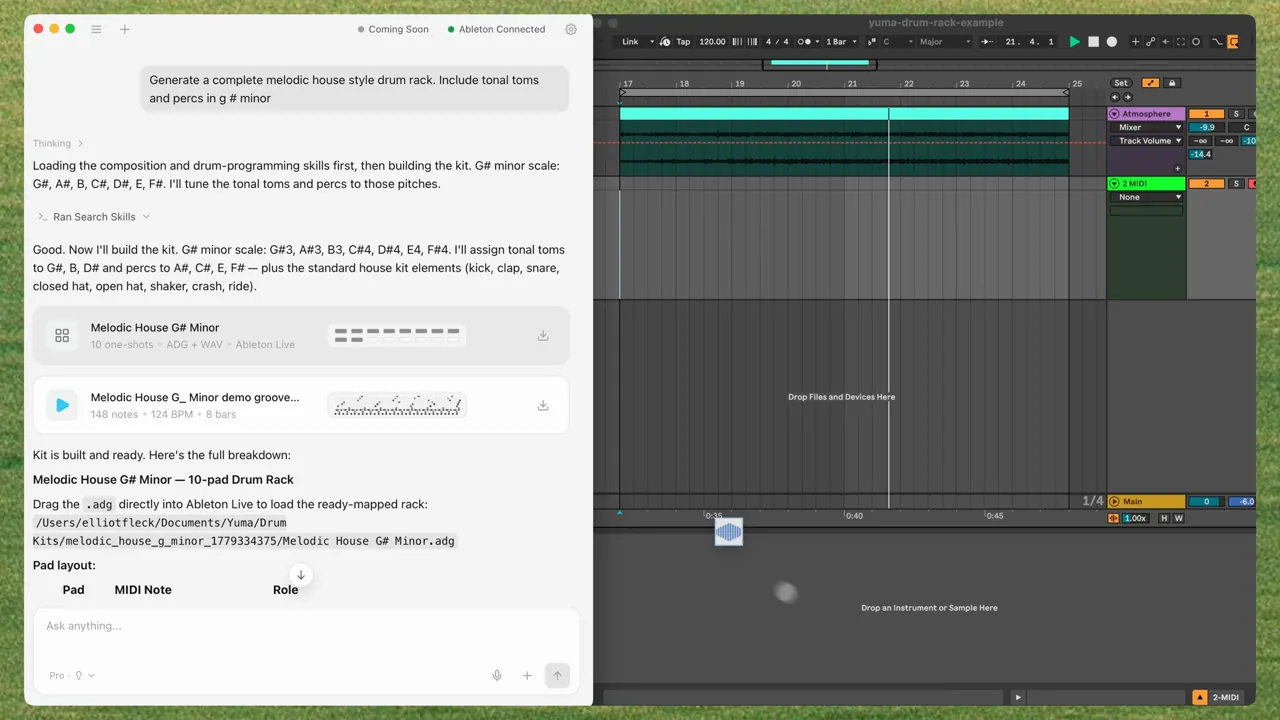
Yuma controls Ableton Live from chat. It connects to the set you already have open, reads musical context, and takes actions inside the session: creating clips, writing notes, placing audio, and drawing automation.
That matters because most AI music tools hand you a file and leave the DAW work to you. Yuma can make files, too. Inside Ableton, it can also act on the track in front of you.
That is the difference between an AI music generator and an AI Ableton integration. Yuma is built to be the most complete AI layer for Ableton Live: Session View, Arrangement View, MIDI clips, generated audio, Drum Rack assets, automation, playback control, and native Ableton objects you can keep editing.
What direct Ableton control means
When Yuma is connected, it can work with the session state instead of guessing from a blank prompt.
It can:
- Generate MIDI clips: chord progressions, melodies, basslines, drums, and arps.
- Write into Session or Arrangement: place clips where they belong instead of making you drag every idea by hand.
- Insert audio on the Arrangement: drop a generated vocal, sample, or one shot onto an audio track as a real clip.
- Build drum rack assets: create a kit folder with samples, a manifest, and an Ableton Drum Rack.
- Write automation: draw filter sweeps, volume rides, panning, and other parameter moves into clips.
- Control the session: read tempo, key context, tracks, clips, devices, and playback state.
The connection happens through a small Ableton Remote Script installed by the Yuma desktop app. After installation, Yuma appears in Ableton's Control Surface dropdown. That gives the desktop app a reliable bridge into the open Live set.
Session View: fast musical sketches
Session View is where Ableton users try ideas quickly. It is also where a chat assistant can save the most friction.
Yuma can use Session View for clip-level work: writing MIDI into clips, creating musical variations, filling empty slots, and responding to what is already in the set. You can ask for a bassline, drum pattern, arp, chord progression, or melody without stopping to export and drag files around.
Good Session View prompts are short and musical:
Make a four bar UK garage drum clip on this track, with a swung hat pattern.
Write a bassline that follows the chords in this scene.
Add a brighter melody variation for the next launch.
The important part is that Yuma is working beside the session. It can use track context, clip length, tempo, and the current musical idea instead of starting from an empty page.
Arrangement View: turn ideas into a timeline
Arrangement View is where a sketch becomes a song. Yuma's Ableton control is useful here because generated audio and automation can land on the timeline.
Yuma can insert generated audio onto an Arrangement audio track. That means a vocal line, transition effect, one shot, texture, riser, or sample can become a real clip in the song. You can trim it, warp it, fade it, resample it, reverse it, or move it like any other audio in Ableton.
Arrangement work also makes the assistant feel less like a novelty. A producer doesn't only need ideas. They need edits, transitions, movement, and structure.
You can ask for:
- A new eight bar idea after the intro.
- A sound effect that lands before the drop.
- A generated vocal texture placed on an audio track.
- A bassline that supports the chorus.
- A filter sweep that opens through a transition.
Yuma does not replace Arrangement View. It helps get musical decisions into Arrangement View faster.
Native instruments, devices, and Ableton objects
Yuma's Ableton work is centered on objects Live already understands: clips, MIDI notes, automation envelopes, audio files, Drum Rack assets, device parameters, and presets.
That matters for trust. If an assistant makes something you can only hear inside the assistant, the workflow breaks as soon as you want to produce. If it creates an Ableton clip, file, preset, or automation lane, you can keep working like normal.
Native instrument and device workflows are part of that direction. The goal is for Yuma to help with the musical object itself instead of a screenshot of the idea. When Yuma helps with a bass, pad, drum kit, or effect movement, the useful output is something you can open in Live, adjust by hand, and save in your own project.
Automation: movement from chat
Automation is where a loop starts to feel arranged. Yuma can write clip automation for moves like filter sweeps, volume rides, panning, and device parameter changes.
Instead of drawing every point by hand, you can describe the shape:
Sweep the filter open over the last four bars, then pull the volume down slightly at the end.
Yuma writes the automation envelope into Ableton. You can keep it, edit the breakpoints, ask for a gentler curve, or delete it. The work lands as normal Ableton automation, which means the producer stays in control.
A prompt becomes a session edit
You can describe a musical move in normal language:
Add a rolling bassline under the chords, then sweep the filter open over the last four bars.
Yuma can read the session, choose the track context, write the bassline as MIDI, and draw the automation envelope for the sweep. You hear it in Ableton and keep editing from there.
The point is speed without losing the DAW. You stay in the project. Yuma does the tedious part of getting the idea into the session.
What Yuma can control in Ableton today
The exact capability depends on your Yuma version, Ableton version, operating system, and the current set. The core model is stable: the desktop app talks to Ableton through the Remote Script, then writes musical material into Live.
| Workflow | What Yuma can do | Where it helps |
|---|---|---|
| MIDI generation | Write notes into clips for chords, basslines, melodies, drums, and arps | Session View and Arrangement clips |
| Audio generation | Save generated vocals, samples, and effects as WAV files, then place audio on Arrangement tracks | Arrangement View and portable DAW workflows |
| Automation | Draw clip envelopes for filters, volume, panning, and device parameters | Transitions, builds, chorus lifts, breakdowns |
| Session control | Read tempo, tracks, clips, devices, and playback state | Context-aware prompts and quick edits |
| Drum kits | Create sample folders, manifests, and Ableton Drum Rack assets | Beat making and sample organization |
| Presets | Create and use preset-style assets where supported | Sound design and native instrument workflows |
Some Ableton API limits still matter. For example, generated audio placement is Arrangement-focused today because Session View audio clip-slot insertion is constrained by Ableton's scripting surface. The fallback is useful: Yuma still saves the WAV file in a normal folder so you can drag it anywhere.
What works outside Ableton
Ableton gets the live-control path because its Remote Script API gives Yuma a way into the open session.
The generated assets are portable:
| Asset | Works in Ableton | Works in other DAWs |
|---|---|---|
| MIDI clips | Yes | Yes |
| WAV vocals and samples | Yes | Yes |
| Drum kit sample folders | Yes | Yes |
| Ableton Drum Rack files | Yes | Ableton only |
| Vital presets | Yes, with Vital installed | Yes, with Vital installed |
Yuma's goal is to meet producers where they work. That means deep Ableton control now and useful files everywhere.
Why we're building it this way
Music software rewards flow. A useful assistant shouldn't make you copy prompts, download mystery files, rename exports, and rebuild the musical idea by hand.
Yuma is moving toward a more direct model: describe the musical decision, watch it land in the session, then shape it yourself.
That is why AbletonGPT became Yuma instead of staying a narrow chat demo. The product needs to understand the session, create editable material, preserve normal DAW workflows, and respect the way producers already work.
The best AI integration for Ableton Live should feel like a faster way to use Ableton, not a separate place where ideas get trapped.
Try Yuma or read the latest release notes.
Frequently asked questions
- Can AI control Ableton Live?
- Yes. Yuma controls Ableton Live through a desktop app and Remote Script. It can read the open session, create tracks and clips, write MIDI notes, place generated audio on the Arrangement, build drum rack assets, and write clip automation.
- Does Yuma only work with Ableton?
- No. Ableton gets the deepest live control today, but Yuma also creates MIDI, WAV, sample, drum kit, and preset files that can be used in Logic, FL Studio, Pro Tools, Bitwig, or any other DAW.
- What does Yuma need to connect to Ableton?
- Yuma uses a small Remote Script installed by the desktop app. After installing it, restart Ableton and choose Yuma from the Control Surface dropdown.